30 September, 2026 | 9 min read

Oracle Redwood explained: Migration strategy, AI capabilities and the 27B deadline

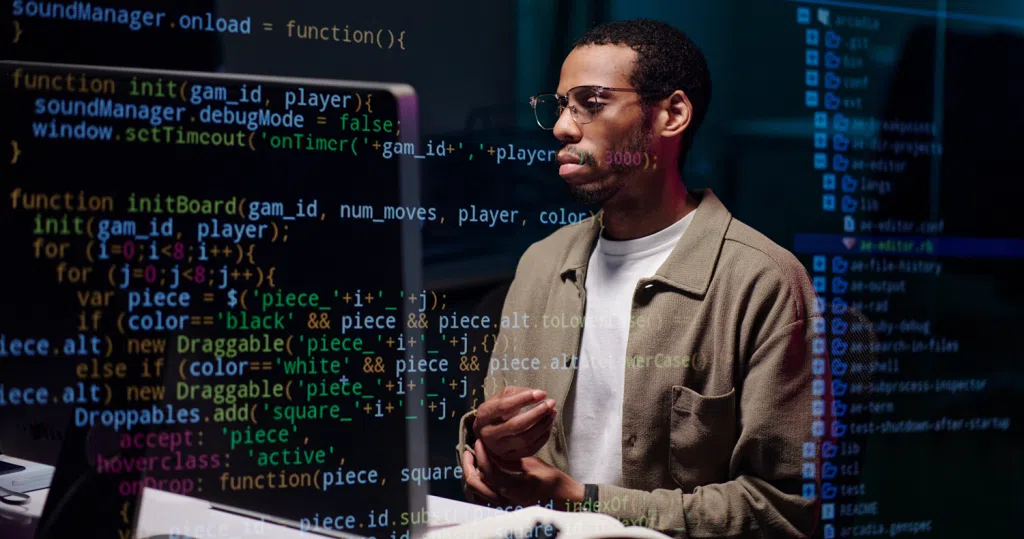
Professional using a laptop to develop applications and automate workflows, illustrating AI-powered low-code development and digital transformation.

By the end of 27A (February to April 2027), all SCM pages must be running on Redwood. After that, Oracle stops supporting Classic. It’s not a suggestion; it’s the date.

For guidance on planning your Redwood migration, watch our on-demand webinar or contact us today.

I don’t want to indulge in unnecessary scaremongering but I do want to be clear about what this means practically.

When we asked SCM leaders what’s driving their move to Redwood, 58% gave the same answer: the mandatory deadline and what happens after.

Here’s what matters: this isn’t a visual refresh, Oracle has made a clear choice. Every innovation the company is creating now goes into Redwood only.

Every AI agent

Every new feature

Every performance improvement

Classic gets none of it. No updates. No new capability. It simply stops.

That gap between what Redwood can do and what Classic can do gets wider every quarter. So, the cost of moving early is considerably less than the cost of moving late. Moving late means you’re not just updating your interface, you’re catching up on six, nine, maybe twelve months of capability you’ve missed.

The timeline: What you’re working with
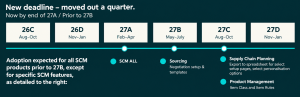
Timeline infographic showing the updated SCM adoption deadline, with adoption expected before 27B and specific SCM feature exceptions extending into 27C.

We’re currently in 26C, so you have roughly three release cycles until 27A hits in February to April 2027. If that sounds like a lot of time, trust me, it isn’t.

26C (now): This is where you are. If you haven’t started Redwood testing, you need to start now.

26D (October-December 2026): Oracle is shipping new AI agents. Requisition creation assistants. Planning exception assistants. Supplier qualification agents. If you’re still in testing mode here, you’re behind.

27A (February-April 2027): This is the deadline. All pages must be in Redwood. All your key processes must have been tested end-to-end. Your users must be trained and working in Redwood. Your customisations must be sorted. Your legacy navigation must be closed off. There’s no partial credit here.

27B onwards: Support for Classic ends. That’s it.

People often assume they can stack everything into that final quarter. Testing, training, configuration changes, adoption — all together. The problem is obvious when you say it out loud: you’ve got maximum pressure and zero time to fix things if they break.

The organisations that start now won’t be under pressure in 27A. The organisations that procrastinate or choose to wait will be.


What you need to do

The work isn’t just about enabling pages. Here’s where most projects get it wrong: they treat this as a technical project. It’s not – it’s an operational change.

  • Test end-to-end processes, not individual pages. Don’t just check that a purchase order page works. Create a requisition, convert it to a PO, receive the goods, process the invoice, and make the payment. Follow the whole cycle. That’s how you find out whether your business actually works in Redwood. One page working in isolation tells you nothing

  • Review your access model. Redwood changes security. In Classic, you assign one seeded role and users get broad access. In Redwood, each user gets specific privileges for specific tasks. This isn’t a problem – it’s better. But it means you need to audit who has access to what, and validate that the right people can do the right things. Nothing more. Nothing less. This is worth doing, because it’s also a chance to tighten security on things that were too open in Classic
  • Sort out your customisations now. Many organisations have built page composer customisations over years to solve problems that Redwood now handles natively. Some of these won’t port directly. Some will need rebuilding. Others can be retired completely. You need to know which is which before you go live. This is an opportunity to simplify, but it requires systematic review
  • Understand that adoption is a design problem, not a training problem. This is important. If you enable Redwood but leave Classic navigation open just in case, users will go back to what they know. More training won’t fix that. You need to close off those legacy routes. Design your menus by role so people only see what’s relevant to them. Align the quick actions to how work actually gets done. These are configuration decisions you make now, not IT projects requiring more funding later
  • Have a hypercare team ready for day one. Most post-go-live issues aren’t process failures. They’re user navigation questions. Having dedicated support available in those first weeks makes a genuine difference to how quickly users get confident and productive

What happens if you stay in Classic

First, the mechanics. After 27B, Oracle won’t accept support tickets for Classic pages. If you raise an issue, they’ll tell you to move to Redwood. That’s not negotiable.

More importantly: Oracle isn’t building innovation for Classic anymore. Everything new – every feature, every capability, every AI agent – goes into Redwood. Classic gets nothing.

These exist in Redwood. Only in Redwood. If you’re in Classic, you don’t get them.

This isn’t static, Oracle is adding new AI capabilities every quarter. 26D is adding more. Then 27A. Then beyond. The gap between what Redwood can do and what Classic can do doesn’t stay flat, it only gets wider.

So, the real question isn’t whether you can afford to move. It’s what you’re giving up if you don’t.

What you gain by moving

I’m not going to pretend this is painless. But there are real benefits.

Users learn it faster

Redwood has a consistent interface across every SCM process. Navigation works the same way in procurement as it does in supply chain as it does in manufacturing. That means new starters pick it up quicker. You spend less time on training. Support queries drop because the design is more intuitive.

Processes run leaner

Workflows are streamlined. Fewer manual steps between screens. Fewer handoffs. When you need data, it’s in context with the work you’re doing, not buried in a report you have to go hunting for. Procurement cycle times compress. Inventory turns faster. Responsiveness improves.

You see problems before they become problems

In Classic, supplier registration managers run reports, work through lists, and often only discover gaps after a purchase order’s already been raised. In Redwood, dashboards surface exceptions automatically. You see what needs attention. You act on it proactively instead of reactively.

AI agents work

When leaders tell us what drives their move to Redwood, only 11% say AI. But here’s what matters: 45% are already partially adopted. Once they go through the migration and start using the agents (the ones that answer questions in plain English, that build requisitions from quotations automatically, that monitor supplier compliance continuously), they realise this is real capability, not marketing fluff. It changes how work actually gets done.

Lower cost to serve

Faster task completion. Fewer clicks. Fewer workarounds. Less training needed. This isn’t theory. This is measurable reduction in cost per transaction. Moving early means you capture this sooner.

Moving from transactions to outcomes

The value of Redwood becomes clearer when it is viewed as a change in the way work is organised, rather than a change in the way screens look. The aim is to bring tasks, insight and action together so that users can respond without moving repeatedly between transactions, reports and spreadsheets.

Streamlined workflows

Fewer hand-offs and clearer next actions can reduce unnecessary administration across procurement and supply chain processes.

Information in context

Dashboards, scorecards and embedded analytics can surface priorities where the work is taking place, rather than requiring users to search for a separate report.

Exception-led working

Role-based views can help teams focus on issues that need attention, moving away from manually reviewing long lists and reacting after a problem has escalated.

A simpler application estate

The transition provides a valuable point at which to review customisations and workarounds, retain those that still deliver value and retire those that Redwood now addresses as standard.

A practical foundation for AI-enabled SCM

Redwood is also the experience through which many of Oracle’s newer AI capabilities are delivered. This is important because the most useful AI in SCM is not a separate tool sitting alongside the process. It’s embedded in the flow of work, using the context of the transaction to help a user understand, decide or act.

The webinar highlighted practical examples across procurement and supply chain. Requesters can use natural language to check the status of a requisition and follow a direct link to the underlying record. Supplier quotations can be used to create draft requisitions for review and reduce manual re-keying. Supplier qualification teams can bring compliance gaps and priority actions into a single workspace. Planners can receive a concise summary of important exceptions and relevant notes, while transportation teams can carry out supported shipment actions conversationally.

The common theme is not AI for its own sake. It is the removal of avoidable effort. When routine searching, monitoring, summarising and data entry can be reduced, people have more time to concentrate on judgement, supplier relationships, operational risk and business decisions.

What you need to do now

  1. Understand where you are. Not where you think you are. Where your users are actually working. It might surprise you
  2. Plan phased, not all-at-once. Start with procurement. Purchasing is the foundation – every downstream process depends on it getting right. Once purchasing is stable, move to receiving. Once that works, bring in supplier management. For wider supply chain, inventory is the foundation. Then order management. Then manufacturing, quality, planning, and maintenance in order of dependency. Don’t try to enable everything simultaneously. You’ll create unnecessary risk and make it harder to identify where problems live
  3. Close legacy navigation paths. Don’t leave Classic open just in case. Users will use it. You won’t capture the adoption benefit. Redesign your menus by role. Align quick actions to how work actually happens. This is configuration work, not a training problem. Do it while you have time to iterate
  4. Start the adoption conversation early. This is real organisational change. The sooner your teams understand what’s coming and why, the better they’ll adapt

27A is not a suggestion. It’s the date. After that, Oracle stops supporting Classic. No workarounds. No exceptions.

The organisations that are starting Redwood testing now won’t be under pressure in February 2027. They’ll be executing. The organisations that wait will be scrambling.

Moving early is the cheaper version of the same journey. You will have to move anyway. The only question is how much time pressure you’re willing to absorb when you do it.

Your deadline is February 2027. Your planning window is now. Everything between those two dates is your opportunity to get this right.

For guidance on planning your Redwood migration, watch our on-demand webinar or contact us today.