

















































































In technology terms, it was a Friday 13th to remember. Microsoft 365 services, including Exchange Online, Teams and Copilot, were massively disrupted worldwide on 12 and 13 November 2026 bringing large sections of the global economy to a communications standstill. Due to severity of the outage, organisations that fall below Microsoft’s 99.9% monthly uptime commitment may be owed a service credit. Credits are not automatic – Microsoft must receive a complete claim by 31st December 2026.
One question for anyone who manages the Microsoft contract: has your Microsoft partner or reseller already contacted you about this credit? If they have, check what they need from you and when. If they haven’t, this post sets out what to do. The deadline is closer than it looks once the holidays are factored in.
What happened
The disruption began on 12th November 2026, and Microsoft reported recovery on 13th November. Microsoft attributed the outage to servers going offline unexpectedly, which put strain on the remaining infrastructure. Exchange Online and Outlook, Teams, Microsoft 365 Copilot and other Microsoft 365 services were affected with some users losing service for more than 12 hours.
To calculate your organisation’s claim downtime (and every business will be different), take your own start and end times from Service health in the Microsoft 365 admin centre. Your claim is assessed on your own users’ downtime, not on the length of the incident overall.
Microsoft tracked the incident under these IDs in the Service health dashboard:
- EX1550543: Exchange Online
- MO1550821: wider Microsoft 365
- TM1550488 Microsoft Teams (Americas only)
Microsoft confirmed the cause and both incident IDs through its Microsoft 365 Status account.
How the credit works, and what it might be worth
The Service Level Agreement for Microsoft Online Services, October 2026 edition, commits to 99.9% uptime each month for Exchange Online. Below that, a service credit applies:
- Below 99.9%: 25% credit
- Below 99%: 50% credit
- Below 95%: 100% credit
These tiers come from the October 2026 edition of the SLA, and organisations on annual or multi-year agreements should check which edition their own agreement carries.
Three points matter commercially:
- The credit is a percentage of the monthly fee for the affected service only. It is not a percentage of your whole Microsoft bill.
- It is applied to a future invoice. It is not paid as cash.
- Downtime is measured in user-minutes for your tenant. The SLA multiplies the length of each incident by the number of users affected. A 30-hour outage reported in the press does not translate directly into your credit. What counts is how many of your users were affected, and for how long.
For reference, in a 30-day month 99.9% uptime allows about 43 minutes of downtime per user, and 99% allows about 7 hours 12 minutes. Your figure depends on your own tenant’s evidence.
A credit covers your actual downtime on the affected service only, cannot exceed that service’s monthly fee, and is your sole and exclusive remedy, so it does not compensate for lost revenue or staff time.
Teams and Copilot: claim only what meets its own definition
The outage hit more than email, so it is tempting to claim for everything that misbehaved. Don’t do this. The SLA sets a separate downtime definition for each service, and each one is narrow:
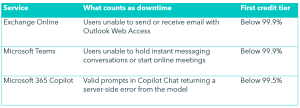
Two consequences exist here.
First, degraded is not the same as down. If Teams chat and meetings kept working while calendar lookups failed, that is real disruption but it does not meet the Teams definition.
Second, Copilot is measured as a percentage of failed prompts rather than minutes of downtime, so the evidence you need is records of failed prompts, not a timeline.
Our advice would be to claim for each service that genuinely met its own definitionand leave out the ones that did not. A claim padded with services that stayed up invites rejection of your entire claim.
Where services were bought separately rather than as a suite, the SLA treats each as its own agreement and expects a separate claim for each. Only one credit is permitted per service per month.
Find your route: Enterprise Agreement, MCA-E or CSP
How you claim depends on how you buy Microsoft 365.
Enterprise Agreement (EA) or Microsoft Customer Agreement for Enterprise (MCA-E)
- A Global Administrator opens a service request in the Microsoft 365 admin centre: Support, then Help & support, then Contact support
- Ask explicitly for an SLA service credit. Quote the incident IDs, list every affected service and attach your evidence
- Approved credits are applied to a future invoice
Cloud Solution Provider (CSP)
- Your CSP partner submits the claim to Microsoft in Partner Center on your behalf
- Microsoft asks for an email from you, sent from an address on the affected tenant’s domain, requesting the credit. Send it to your partner now
- The credit lands on your partner’s Microsoft invoice. Agree in writing how and when it will be passed on to you
- Send your request to your partner before 15th December 2026 so they have time to prepare and file before Microsoft’s deadline.



Microsoft sets out what a CSP credit claim needs, including the request email from the affected tenant’s domain, in Request a credit from Microsoft in its Partner Center documentation.
What a claim must include
The SLA requires a detailed description of the incident, the time and duration of the downtime, the affected resource names, the number and locations of affected users, and a description of the errors that occurred. It states plainly that missing information results in rejection.
Build the file once, properly:
- Tenant ID (GUID).
- Incident IDs: EX1550543 and MO1550821, plus CR1550885 or CR1551339 if Dynamics 365 was affected
- Every affected service, listed separately, with what was unavailable, in the terms the SLA uses for that service. For example: “Exchange Online: users could not send or receive email in Outlook on the web.” A claim that names only Exchange Online will be assessed only for Exchange Online, and a service that stayed within its own definition should be left out
- Start and end time of the impact for each service, as your organisation experienced it, with time zone
- The number and location of affected users, and how it affected their work
- A description of the errors: error messages, screenshots, failed Copilot prompts
- What you did to try to resolve it, and any support ticket numbers from 12th and 13th November
- Which subscriptions were affected
Do this today: export the incident history from Health, then Service health, in the admin centre, and keep your helpdesk ticket references from the outage period. Service health only displays recent issue history, so the record you need to quote will not sit there indefinitely. Check also how your own tenant’s record classifies what you experienced: advisories are not usually eligible for a credit, whereas incidents are.
Key dates and what to do now
- Now: export Service health history and helpdesk records
- Before 15 December 2026: CSP customers send their request email to their partner
- 31 December 2026: Microsoft must receive the claim, with all required information. The SLA gives you until the end of the calendar month following the month of the incident. CSP customers should confirm the date with their partner, because Partner Center guidance for partner-submitted claims counts from the end of the billing month
The holiday period will slow every step. Treat 15th December as the working deadline, whichever route you are on.
How we can help
If you buy Microsoft 365 through Version 1 as your CSP: you do not need to do anything. Our team is identifying affected tenants, gathering the evidence, filing claims and passing credits on. We may ask you for the request email from your tenant domain.
If you buy through another provider or direct: we will help you prepare your claim, free. Our claim readiness pack gives you the incident IDs, your downtime timeline, a credit estimate and a ready-to-send claim for your current provider or for Microsoft. We never take a fee from a customer’s credit.
To request your free claim readiness pack, or to check whether your tenant is covered, get in touch with our team.