




























































Following on from our previous webinar, ‘Unlocking the power of Oracle AI: transforming Oracle HCM and SCM with next-generation agents’, we’re now turning our attention to the opportunities Oracle AI Agents can unlock across ERP.
In this blog, key takeaways will be shared from our latest webinar, ‘Unlocking Value with Oracle ERP AI Agents’, including an overview of the five new AI agents introduced in Oracle Fusion 26B and what they could mean for finance teams seeking greater efficiency, visibility and value.
During the session, we ran a poll asking which of those agents was most valuable to attendees.
The Ledger Agent came top with 31% of votes, closely followed by the Expenses Agent (27%) and Payables Agent (25%). Cash and Payments Agents rounded out the rest.
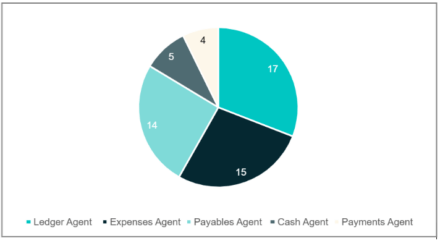
That spread tells its own story. Finance teams aren’t excited about one narrow use case. They’re looking at AI across the whole ERP landscape, from how invoices land in the system to how the general ledger gets monitored and queried.
Here’s what the five agents do:
The Expenses Agent
The promise here is straightforward: no more form of filling. An employee makes a purchase and forwards the receipt. The agent then reads it, extracts the details, if a corporate card was used, it matches it to the charge, checks it against policy, and emails back if anything’s missing. The whole thing runs through a conversation rather than through a submission screen.
I’ve watched an Oracle colleague submit an expense for lunch from start to end before they’d reached the top of an escalator. That’s not a demo scenario, that’s the product being used in real time.
One thing to note: although the Expenses Agent is available in 26B, email-based conversations still require a Service Request (SR) to be raised with Oracle first.
The Payments Agent
Payments traditionally meant ‘invoices come in, payment runs go out’. The Payments Agent adds intelligence to that mechanical process.
It comes with three assistants:
The Payment Options Assistant looks at outstanding invoices alongside programmes like dynamic discounting and virtual cards, then calculates the financial benefit of each based on payment terms and cash position
The Supplier Offer Assistant identifies where dynamic discounting makes sense for a specific supplier, drafts the offer, sends it and tracks responses
The Payment Execution Assistant handles scheduling, monitors for failures and surfaces exceptions before they become problems
Core features are available out of the box in 26B. More advanced insights still require a SR to Oracle.
The Payables Agent
The Payables Agent focuses on making invoice processing as touchless as possible. Invoices arrive by email, PDF or e-invoicing channel. The agent then reads them, extracts the key data, defaults missing attributes like cost centers or general ledger (GL) accounts, and flags anomalies in real time. Accounts Payable (AP) teams move away from processing every invoice individually and focus instead on the exceptions the agent surfaces. This one isn’t generally available yet. It’s still an early adoption programme, so Oracle needs to be contacted to access it.
The Cash Agent
The Cash Agent does the same pattern-recognition trick, but for bank statements and remittance advisers. It reads documents, creates receipts, matches payments to invoices and highlights where it can’t make a clean match. Focus can shift to exceptions rather than line-by-line processing.
This was a late addition to 26B and is early adoption only – so, again, there’s a need to contact Oracle to access it.
The Ledger Agent
This is the one that came top of the poll, and it’s not hard to see why.
The Ledger Agent sits across GL and works across three areas. Proactive monitoring uses configurable AI-based alerts to surface anomalies and unusual movements as they occur, rather than waiting for someone to run a report. Insights take those alerts and add a narrative (not just what has changed, but why). Natural language inquiry lets users ask questions in plain English across GL, payables and receivables data, without the need to navigate to separate screens.
The Ledger Agent is available out of the box in 26B with no formal opt-in, though configuration is required to set up roles and access controls.
Pricing: what’s changing
Oracle announced a pricing restructure at AI World London in March. The formal start date hasn’t been confirmed, but it’s expected in June 2026.
Under the old structure, customising an out-of-the-box agent made it a custom agent and therefore chargeable. That created a strange incentive where organisations avoided the customisation they actually needed.
The new structure is simpler. Pricing is driven purely by the LLM you use:
- The basic LLM is free, even if the agent is customised or built it from scratch
- Premium Oracle LLMs are charged by token consumption, not by the agent itself. Your subscription includes 20,000 AI units per month (one unit equals one US cent). A full chat interaction with a premium LLM costs around $0.05, but if you bring your own LLM via API key, that drops to roughly $0.03
One thing to check —many out-of-the-box agents default to a premium LLM like GPT-4.1 mini. Under the new pricing, that makes them chargeable even if you haven’t touched them. The fix is straightforward in AI Agent Studio, but it’s worth auditing before the new structure kicks in.
AI Agent Studio Updates
There are also two features worth calling out from the Studio side:
- The Microsoft Teams integration has got a meaningful upgrade. You can now add the Teams tool to an agent using the basic LLM with no charge, which resolves the main commercial hesitation from earlier discussions. Agents surface natively inside Teams with full conversational capability, access controls follow Oracle Fusion’s RBAC framework, and configuration stays inside AI Agent Studio
- Metro is the governance and monitoring layer inside AI Agent Studio. It tracks session volumes, response latency, error rates and turn counts for live agents. On the evaluation side, it supports quality testing before go-live, including AB comparisons and LLM-as-a-judge scoring. A usage tab is coming in 26C that will show AI unit consumption directly inside Studio, broken down by agent, without needing to go into OCI. For anyone responsible for AI spend, that’s a significant addition.
What’s coming next
26B agents are mostly focused on inquiry and monitoring. 26C and 26D will push further into action-oriented capability:
- Creating journals from within the agent
- More automated execution
- The agentic application builder that lets customers compose their own multi-agent workflows without code
The roadmap is moving faster than most organisations can evaluate. Getting familiar with what’s available now and making sure the environment is correctly configured and audited for the new pricing, puts users in a much stronger position when the next releases land.
We have over 700 dedicated Oracle consultants and more than 500 certified professionals. We are actively working with customers to enable, configure and get value from Oracle AI agents.
For more information, watch the webinar recording or if you want to see what this looks like in your own environment, get in touch with us.